Any job that includes a Mount (setting or adjusting bindings) requires the customer to sign a liability waiver first. FlowState tracks whether that waiver is signed and won't let you confirm the drop-off until it is. You can have the customer sign by sending a link to their phone.
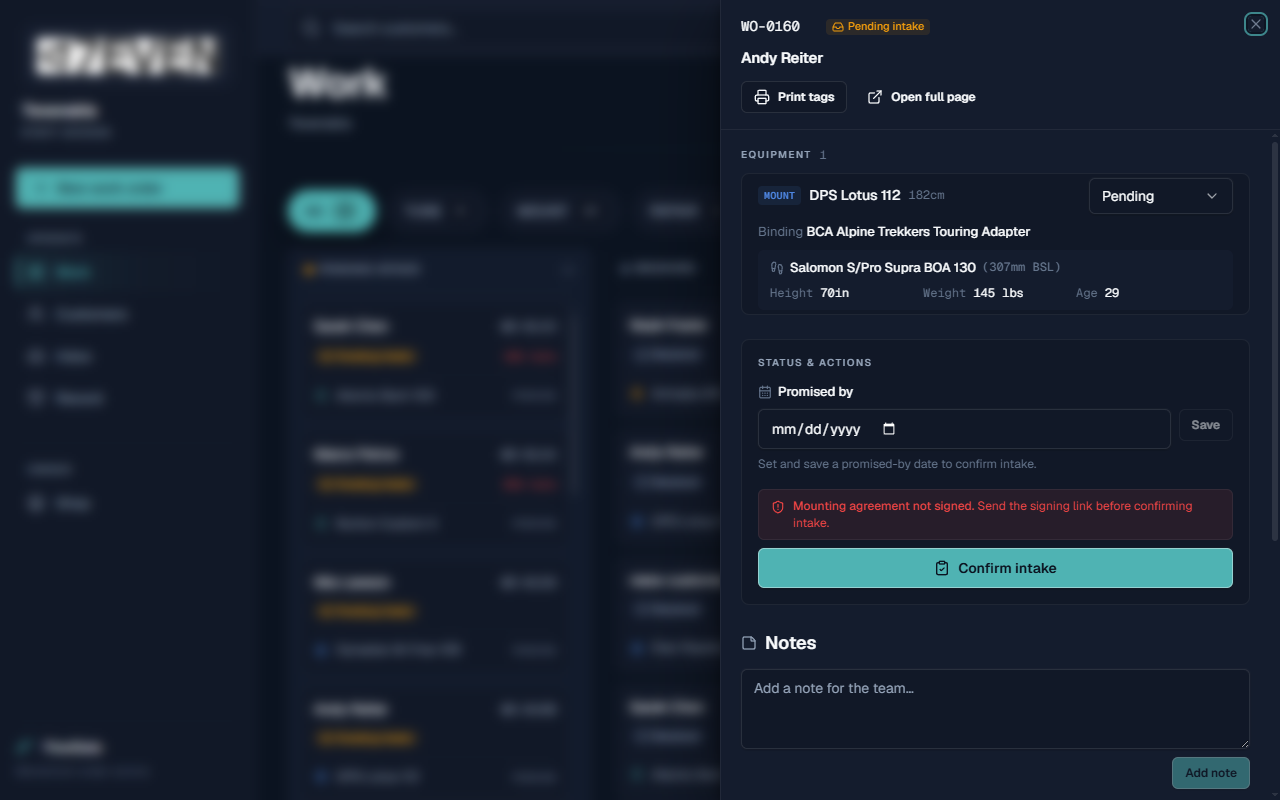
Who can use it
- Everyone on your shop's team can send the signing link and see whether a waiver is signed.
- The wording of the waiver is set in Shop Settings, which anyone with a login can open.
How to use it
Check whether the waiver is signed
- Open a mount work order from the Work board.
- Look at the Mounting agreement section. It shows Not signed or Signed.
Send a signing link to the customer
- In the Mounting agreement section, click Send agreement link.
- FlowState sends the link to the customer (the panel shows the address it's sending to).
- The customer opens the link on their phone and signs.
- Refresh the order; the status updates to Signed.
Confirm intake once it's signed
- With the waiver signed, set a Promised by date and click Save.
- Click Confirm intake to make the job active. See Managing a Work Order.
Find all mounts still waiting on a waiver
- Open the Work board and switch to the Pulse view.
- Under Pending agreements, you'll see every mount missing a signature, each with a Send button to resend the link.
What to expect
- A mount order clearly shows Not signed until the customer signs.
- While unsigned, Confirm intake is blocked and a reminder appears: "Mounting agreement not signed. Send the signing link before confirming intake."
- Once signed, the order can be confirmed and worked like any other job.
- A signed waiver is stored on the customer's profile under Documents for your records.
Limitations
- Only Mount jobs require a waiver. Tunes, repairs, and other services don't.
- Intake cannot be confirmed on a mount until the waiver is signed — there's no override at the counter.
- The waiver's exact wording, title, and jurisdiction are set in Shop settings and apply to all mounts.
Frequently asked questions
The customer is standing right here. Do they have to use their phone? Sending the link lets them sign on their own phone, which is the built-in way to collect a signature remotely. The link goes to the email on their record.
Can I take in a mount and get the signature later? You can create the order, but you can't confirm intake until it's signed. Send the link right away so the job can move forward.
Where does the signed waiver go? It's saved to the customer's profile under Documents. See Managing Customers.
What does the waiver actually say? It's your shop's liability waiver for binding work — covering the risks of skiing, how settings are determined, and a release of liability. Anyone with a login can view and edit the full text in Shop Settings.
Can I change the waiver wording for one customer? No. The waiver is the same for every mount. Wording changes are made in Shop settings and apply to all.
Troubleshooting
- The status still says "Not signed" after the customer signed. Refresh the order. If it still hasn't updated, confirm the customer completed and submitted the form, and that the link went to the right email.
- "Confirm intake" is greyed out or blocked. The waiver isn't signed yet, or there's no promised-by date. Handle both, then try again.
- The link went to the wrong email. The link uses the email on the customer's record. Make sure their contact details are correct (set during Creating a Work Order).